 DartPDF
First, choose the kind of PDF editing you need
“PDF editing” can mean three different jobs. Using the right layer avoids building an editor around a package that only creates new documents or draws temporary overlays.
Use PdfEditorView for ready-made viewer, toolbar, panels, gestures, undo/redo, and save
UI.
Use PdfEditingController, PdfViewer, or the lower-level
PdfEditor API.
That is document generation, not editing. Use a PDF-generation package when there is no existing file to preserve.
This guide takes the first path: a drop-in editor for an existing PDF. You can progressively replace its stock chrome later because the viewer, controller, toolbar, and panels are also public widgets.
Install the Flutter PDF editor
From the root of your Flutter project, add the editor package:
flutter pub add dart_pdf_editorNo native PDF SDK, license key, or platform view is required. The parser, renderer, editing engine, and UI are implemented in Dart.
flutter pub add dart_pdf_editor_assets and call
registerBundledEditorAssets() before runApp. The core editor works without this
optional package.
Load the existing PDF as bytes
PdfEditorView accepts a Uint8List, so the document can come from an asset, file
picker, database, cloud object store, or HTTP response. Loading an asset looks like this:
import 'dart:typed_data';

import 'package:flutter/services.dart' show rootBundle;

Future<Uint8List> loadPdf() async {
  final data = await rootBundle.load('assets/sample.pdf');
  return data.buffer.asUint8List();
}
Declare the file under flutter/assets in pubspec.yaml when loading from your app
bundle. If a user picked the PDF, pass the picker's returned bytes instead.
Put the editor in a bounded Flutter layout
The following widget is the complete editor integration. The shell includes page thumbnails, search, annotation and properties panels, editing tools, forms, keyboard shortcuts, touch and stylus input, and undo/redo.
import 'dart:typed_data';

import 'package:dart_pdf_editor/dart_pdf_editor.dart';
import 'package:flutter/material.dart';

class PdfEditorScreen extends StatelessWidget {
  const PdfEditorScreen({
    super.key,
    required this.pdfBytes,
    required this.savePdf,
  });

  final Uint8List pdfBytes;
  final Future<void> Function(Uint8List bytes) savePdf;

  @override
  Widget build(BuildContext context) {
    return Scaffold(
      body: PdfEditorView(
        bytes: pdfBytes,
        onSave: savePdf,
      ),
    );
  }
}
Give the editor bounded space: a Scaffold.body, an Expanded child, or a sized
panel. The stock Save button and Ctrl/⌘+S both call
onSave with the current PDF revision.
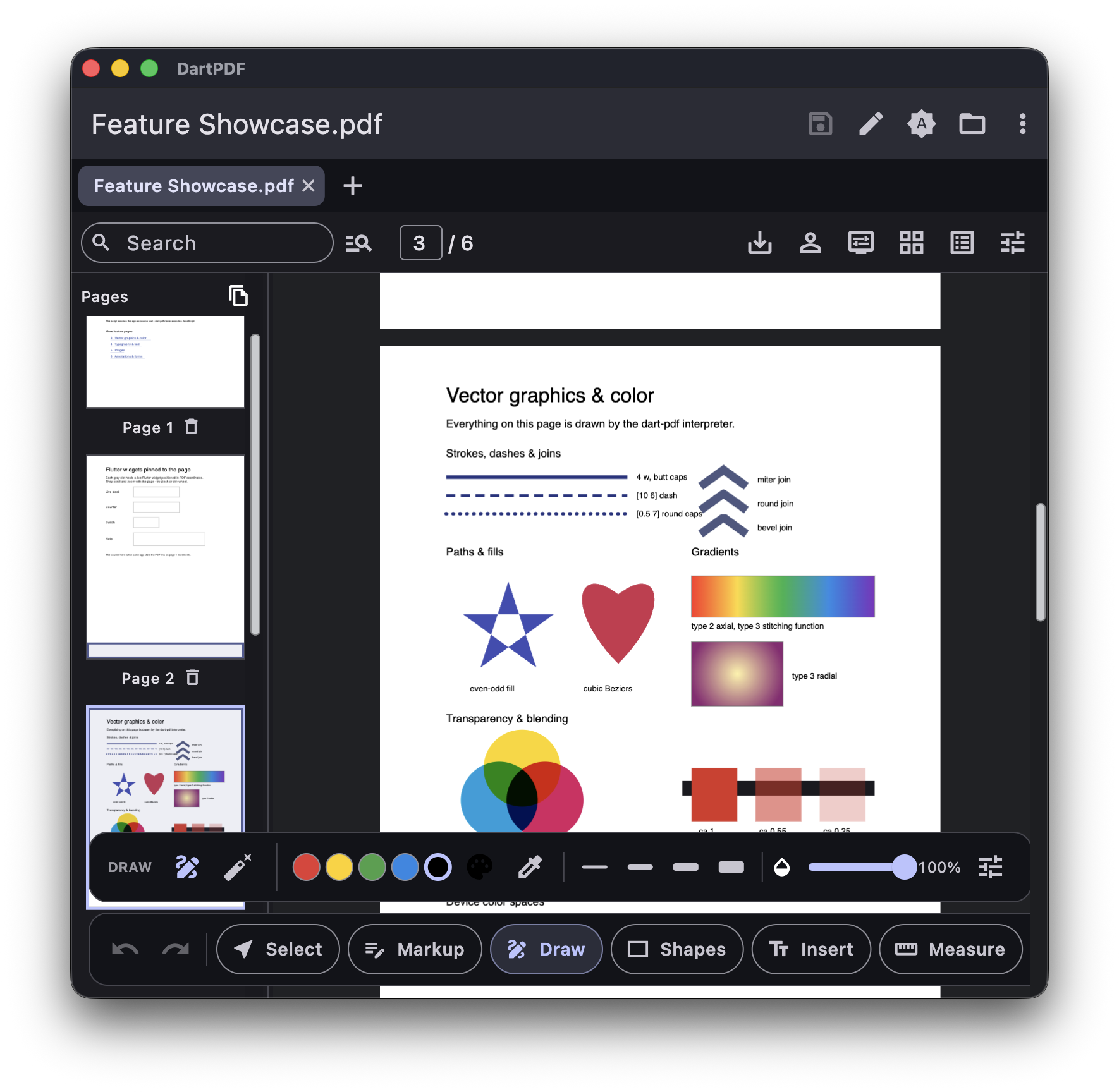
PdfEditorView supplies the complete editing surface shown here; the surrounding
file picker and storage remain under your app's control.Save, upload, or share the edited PDF
The editor deliberately returns bytes rather than choosing a storage package for you. That keeps the widget equally usable on mobile, desktop, web, and in apps with their own storage or sync layer.
Future<void> savePdf(Uint8List editedBytes) async {
  // Choose the destination your app already uses:
  // - write to a user-selected local file
  // - upload to your API or cloud storage
  // - attach to a share sheet
  // - store as a new document revision
  await documents.save('edited.pdf', editedBytes);
}
For autosave, use onDocumentChanged. It fires after an edit, undo, or redo and receives that
revision's complete bytes. For programmatic access, construct a PdfEditingController and pass
it through PdfEditorView(controller: ...).
What can users edit?
The editor changes the PDF itself and writes the changes back into the saved file. It is not a screenshot canvas layered over the document.
| Editing need | Included support |
|---|---|
| Annotations | Highlight, underline, strikeout, ink, shapes, text boxes, notes, stamps, images, links, and measurement tools |
| Existing text | In-place text changes plus paragraph-aware reflow where the page content permits it |
| Forms | Fill and author AcroForm text, checkbox, radio group, combo box, list box, and button fields, and place empty signature fields to sign later |
| Pages | Reorder, rotate, delete, append, merge, extract, and split pages |
| Signatures | Drawn signatures and certificate-backed PAdES digital signatures |
| Redaction | True redaction that removes covered text and images from the saved bytes |
| OCR | A pluggable OCR seam for adding an invisible, searchable text layer to scans |
| Platforms | Android, iOS, Linux, macOS, web, and Windows from the same Dart implementation |
Every edit is an incremental PDF revision. The controller uses those revisions for undo/redo and can emit annotation changes for a collaborative store. See the Flutter PDF editor overview for architecture, performance measurements, package layers, and the comparison with commercial SDKs.
How to customize the editor
Turn off stock features without rebuilding the shell. This example exposes only selection, ink, and text boxes and adds a host-controlled Publish action:
PdfEditorView(
  bytes: pdfBytes,
  features: const PdfEditorFeatures(
    propertiesPanel: false,
    flatten: false,
    tools: {
      PdfEditTool.select,
      PdfEditTool.ink,
      PdfEditTool.freeText,
    },
  ),
  toolbarTrailing: [
    (context, editing, viewer) => IconButton(
      icon: const Icon(Icons.cloud_upload_outlined),
      tooltip: 'Publish',
      onPressed: () => publish(editing.bytes),
    ),
  ],
)
For fully custom chrome, use toolbarBuilder or compose the public PdfViewer,
PdfEditingController, PdfEditingToolbar, and panel widgets directly.
Common Flutter PDF editing questions
Can Flutter edit text already inside a PDF?
Yes, but PDF text is positioned page content rather than a Word-style flowing document. The editor can replace existing text in place and reflow supported paragraphs. Complex layouts and unusual embedded fonts may require a narrower edit or a replacement text box.
Is this different from the pdf package?
Yes. The pdf package is primarily a document generator: it builds a new PDF from Dart
widgets. dart_pdf_editor opens, renders, interacts with, and saves changes to an existing PDF.
Do PDFs get uploaded to a server?
No. Parsing, rendering, and editing run locally by default. The widget accepts and returns bytes; an app only uploads them if its own save callback chooses to.
Do I need a commercial PDF SDK or license key?
No. dart_pdf_editor is Apache-2.0 licensed and does not require an activation server,
per-document fee, or commercial SDK. Commercial products may still be appropriate when a project needs a
vendor SLA, consultancy, or an established procurement relationship.
Does it work on Flutter web and desktop?
Yes. The same package supports Android, iOS, Linux, macOS, web, and Windows. There are no platform views and no native PDF library below the Flutter UI.
Try the complete editor
The web demo opens with a built-in showcase PDF, so you can test text editing, annotations, forms, page management, signatures, redaction, and saving before adding the package to your app.